A website review, using this site

This sample reviews atroviola.com itself so you can inspect the changes and rerun the checks without access to private client work. It follows five observations about choosing a service and requesting a call.

The question

Can a first-time visitor choose a relevant service, inspect past work and understand how to request a call? I reviewed the homepage, service catalog and inquiry path. The existing prices, service scopes and three past projects stayed unchanged.

Five observations and changes

  1. Make the first service choice smaller

    Observation
    The homepage listed eleven offers before the work examples.
    Change
    Keep three core packages on the homepage and move the other eight offers into a linked catalog. Retain every price, scope and exclusion.
    Reasoning
    A visitor can begin with a website, an app repair or an integration, then open the catalog for specialist or ongoing help.
    Inspect the full service catalog
    View before and after

    These screenshots were rendered from saved versions of this site at the same 1,280px browser width in light mode. They reconstruct the before and after pages; they are not original production screenshots.

    Before: eleven offers

    The complete service section before the change. Saved source 2ed5582, rendered November 14, 2026.
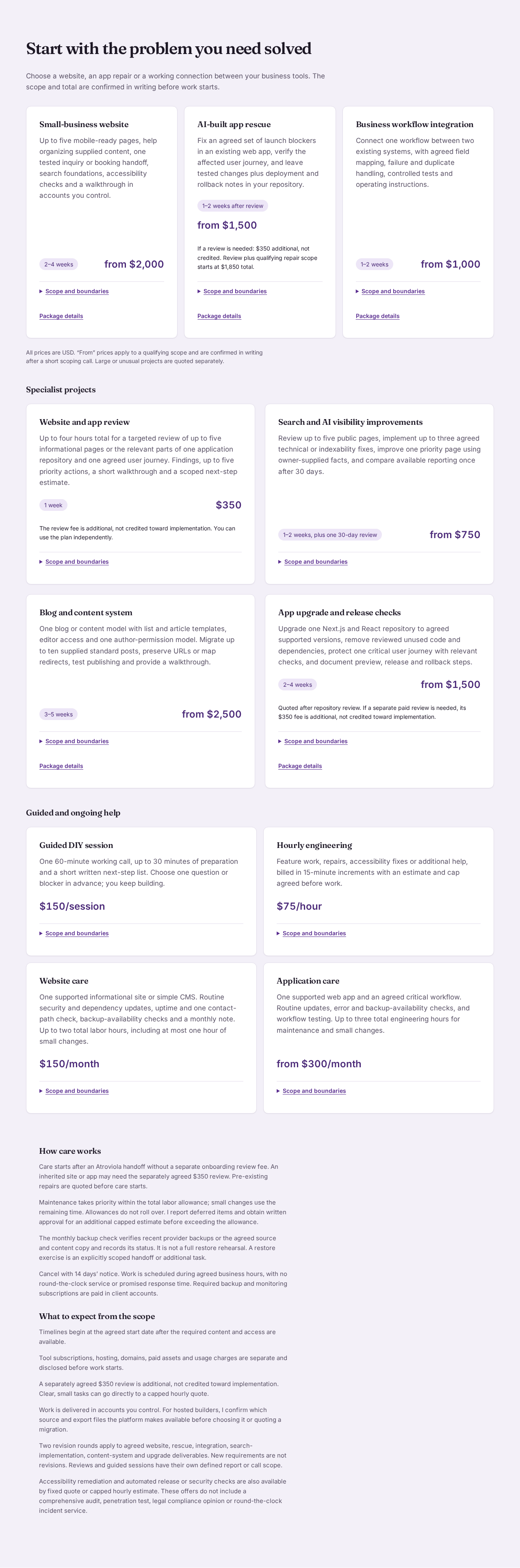
    The earlier homepage service section, with three core packages, four specialist projects and four guided or ongoing options.Open full-size image
    After: three core offers

    The complete service section after the change. Saved source f8561e6, rendered November 14, 2026.
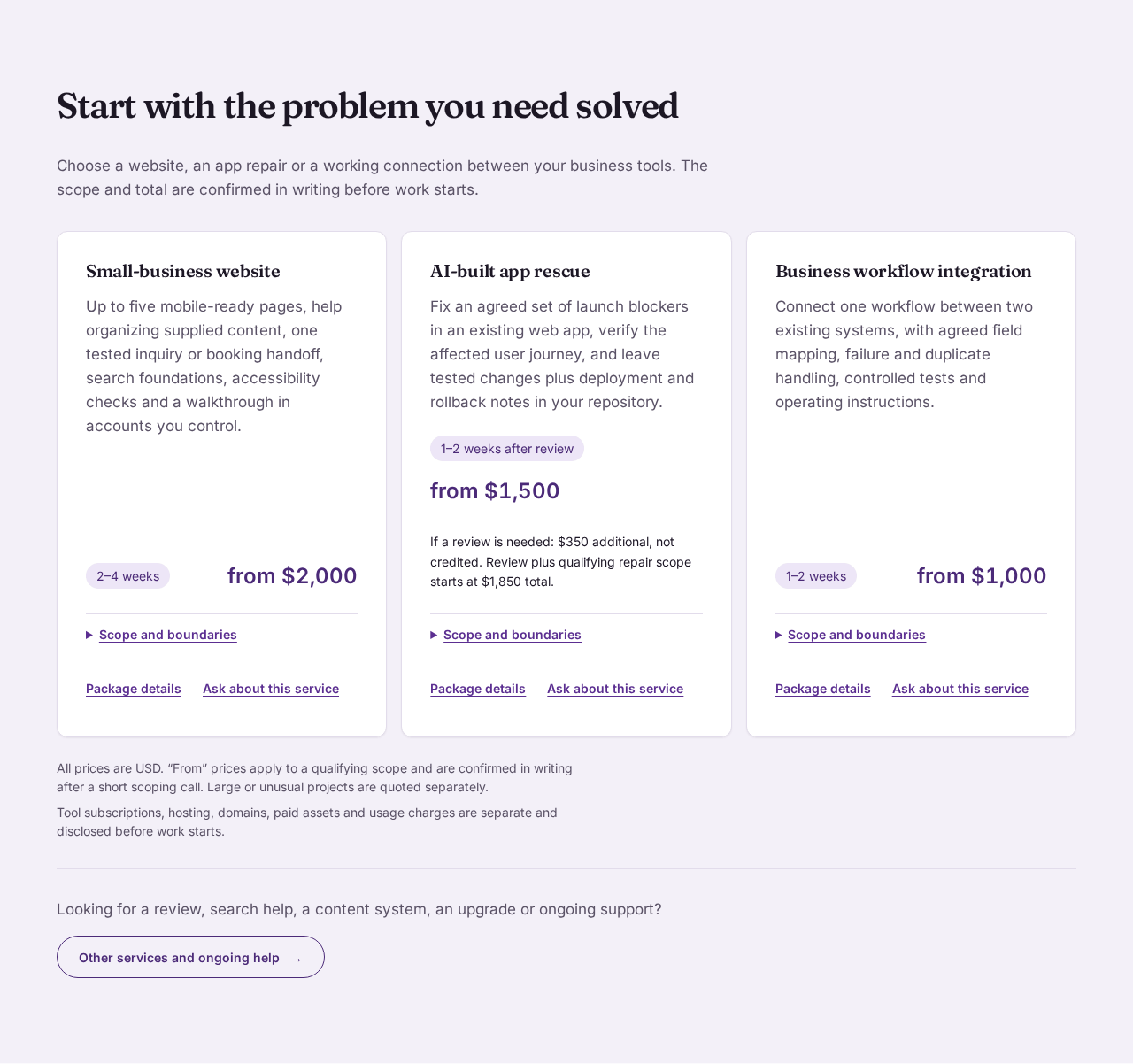
    The shorter homepage service section, with three core packages and a link to the other eight offers.Open full-size image
  2. Put existing work beside the initial choice

    Observation
    A visitor had to pass the full service catalog and shared terms to reach recent work.
    Change
    Place the same three work examples immediately after the core packages and catalog link.
    Reasoning
    Visitors can compare the offer with a concrete example before reading through the project process.
    See where recent work appears
  3. Describe what the call button actually does

    Observation
    The site said “Book a free call,” while the next step was an inquiry rather than an appointment calendar.
    Change
    Use “Request a free call” and explain that I reply by email to arrange it. Keep email as an alternative.
    Reasoning
    The wording tells visitors what to expect after they send their details, without promising a response time.
    Read the call request handoff
    View before and after

    These screenshots were rendered from saved versions of this site at the same 1,280px browser width in light mode. They reconstruct the before and after pages; they are not original production screenshots.

    Before: Book a free call

    Hero actions before the wording change. Saved source 2ed5582, rendered November 14, 2026.

    The earlier hero button reads Book a free 20-minute call, beside See packages.Open full-size image
    After: Request a free call

    Hero actions after the wording change. Saved source f8561e6, rendered November 14, 2026.

    The updated hero button reads Request a free 20-minute call, beside See packages.Open full-size image
  4. Separate required details from optional planning

    Observation
    The form showed contact and planning fields alongside the three required answers.
    Change
    Start with business or project name, email and project description. Keep service and Website optional; put the other optional text fields under “More details.”
    Reasoning
    Visitors can send an inquiry before they know their budget or timing. Website stays visible so a malformed address can receive focus even without JavaScript.
    Inspect the inquiry form
  5. Answer common scope questions in one place

    Observation
    Information about ownership, recurring costs and changes was spread across package details and terms.
    Change
    Add four homepage answers about accounts and files, continuing costs, changes after handoff and an existing site or app.
    Reasoning
    Visitors can check these boundaries before deciding whether to request a call. The answers reuse the existing terms.
    Read the four shared answers

How the changes are checked

The review separates editorial judgment from checks that can be repeated. These are the checks used for this release.

Content and navigation

Compare every offer’s price, scope and exclusions with the approved catalog. Check the three-plus-eight split, page order, links, canonical addresses and sitemap.

Keyboard and smaller screens

Check keyboard order, visible focus, optional disclosures, light and dark themes, narrow layouts and enlarged text. Run automated accessibility checks on the sampled routes.

Inquiry behavior

Exercise the live form with known and invalid service links, restored choices, required fields and malformed Website values. Intercept submission requests in the test browser before they reach Netlify, with and without JavaScript.

Page measurement and privacy

Check which pages load analytics, inspect the outgoing data and include the remote script in transfer measurements. Keep inquiry details out of analytics.

Recorded results

Each result applies to its recorded version, test conditions and time.

Download the production check summary (JSON)
Mobile homepage performance

Lighthouse: 99 Performance · 100 Accessibility · 100 Best Practices · 100 SEO

Lighthouse 13.6.0 tested the production homepage with Cloudflare analytics enabled. Largest Contentful Paint was 1.15 seconds, Cumulative Layout Shift was 0, and the page transferred 108,337 bytes, including the remote script.

This is one mobile lab run of the homepage, not a score for every page or a field measurement of every visitor. Results can change with the device, network, site and analytics script. Use the links below to run a fresh check.

2026-11-14 at 08:25 UTC · production homepage

Automated accessibility

0 axe violations in 28 production route/theme cases

Playwright and axe-core 4.13.0 tested https://atroviola.com. Fourteen routes in light and dark themes make 28 cases. Each case included three axe scans: the initial page, after opening any disclosures, and with the mobile menu open, for 84 scans total.

The 28 cases count page-and-theme combinations, not every individual check. They include the inquiry, confirmation and missing-page routes. Automated scans do not establish complete accessibility or replace a spoken screen-reader check.

2026-11-14 at 08:51 UTC · production pages

Layout and enlarged text

Automated reflow and doubled-text checks passed

Each of the 28 production cases was checked at 320, 390, 640, 768 and 1440 CSS pixels. A separate automated check doubled the root text size at 320px with disclosures open.

These layout checks are separate from the axe scan count. Doubled text is not the same test as native browser zoom, and these checks were automated rather than performed by hand.

2026-11-14 at 08:51 UTC · production pages

Inquiry handoff

Required fields, service selection and no-JavaScript submission checks passed

The browser tests loaded https://atroviola.com/start/ and exercised service links, restored selections, optional fields and submission with and without JavaScript. Requests were intercepted in the test browser before they reached Netlify.

The page under test was production. Interception prevents test inquiries from entering the real queue; it does not prove inbox delivery, a reply or payment processing.

2026-11-14 at 08:51 UTC · production form

Check the public homepage yourself

These tools open a fresh check of the current homepage. Their findings can change as the site, tools and test conditions change.

What this sample does not establish

  • This is a review of my own site. It does not contain a client endorsement or a measured change in inquiries, sales or conversion.
  • Automated accessibility checks and keyboard checks cover specific conditions. They do not establish complete accessibility, assistive-technology coverage or legal compliance.
  • The form checks use the production page but intercept submission requests before they reach Netlify. They do not create real inquiries or prove inbox delivery or a reply.
  • Performance results describe the tested page, browser, network and time. A third-party script can change after a measurement.
  • Page views can be missed or repeated and do not count unique people, completed inquiries or revenue. Confirmed inquiries come from the inquiry records.

Have a focused question about your site?

The Website and app review offer defines the time allowance, deliverables and boundaries. I agree the review question and usable access with you before work starts.

